Property upkeep
Residential Upkeep · for homeowners Commercial Upkeep · for businesses & nonprofits
Property transactions
Buyers · before you own it Sellers · getting ready to sell Partners · for agents & inspectors
Add-ons
Guardian · protection for Residential, coming soon Pro · home concierge
Features
Sources Capture Document intelligence Home knowledge graph Product knowledge graph Place intelligence Plans and priorities DIY or pro All features →
Explore
Pricing
Resources
Guides Support Getting started Data & privacy About Sign in Start free →

Features · DIY or pro

Do it, learn it,
or hire it out.

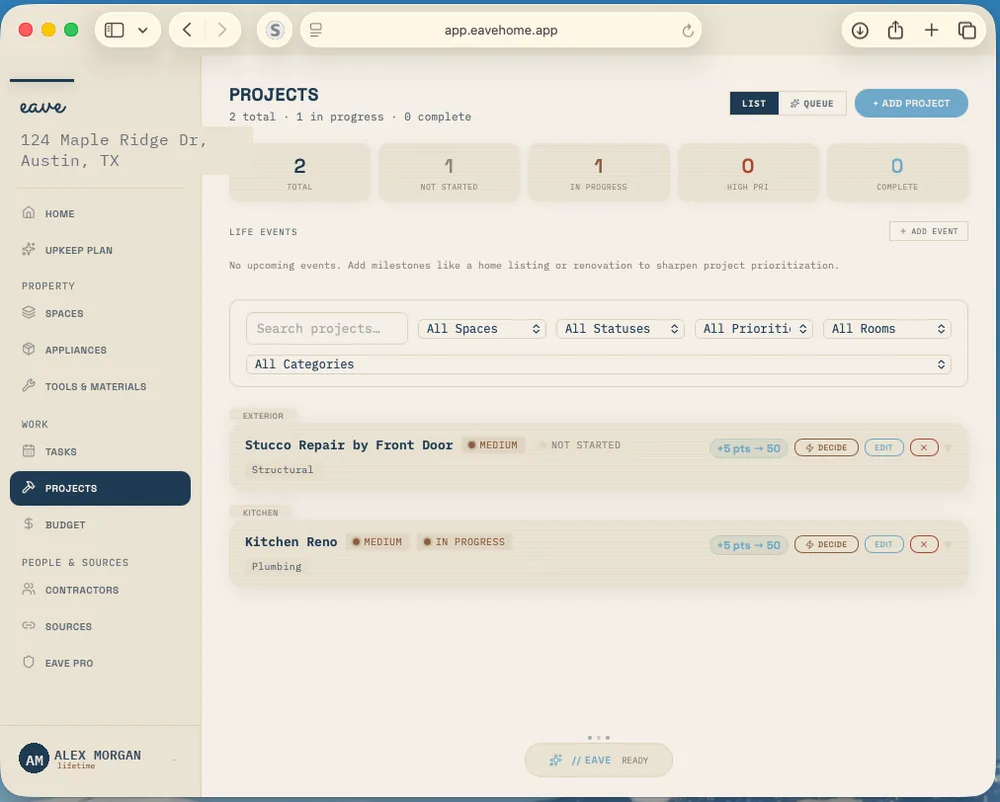
Every project in Eave asks one question: how will you handle this? Do it yourself with a costed materials list. Learn it first, with tutorials picked for the job. Or hire it out, with local pros and a place to track their quotes. You pick, and the plan follows.

Plan your first project →How it fits the engine

Free for one home. No card. Runs in any browser.

The Eave Projects page: a water heater replacement waiting on a contractor, a fence repaint in progress, a basement shelving build not started, and a kitchen faucet swap complete, each with an estimated cost
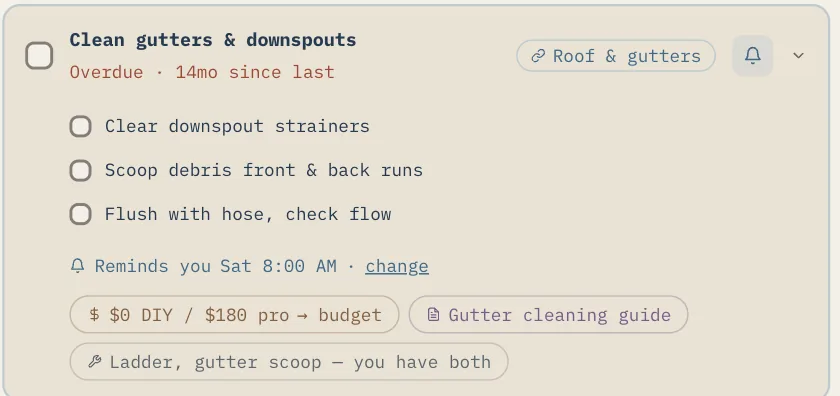
Tasks · cost both ways
An overdue gutter-cleaning task with three steps, a Saturday reminder, and a chip reading $0 DIY / $180 pro

The weekend question

Can I do this myself,
or do I call someone?

A dripping faucet, a sagging fence, a water heater on its last year. The honest answer depends on the job, the tools you already own, how long it takes, whether it needs a permit, and what your Saturday is worth.

DIY or pro puts those pieces side by side on every project, so you choose with the numbers in front of you, and change your mind without starting over.

“I’d have done it myself if I’d known it was a two-hour job.”

3 paths
on every project: DIY, Learn & do, and Hire it out
3 tutorials
picked for the job, each with its source, its length, and why it made the cut
1 tracker
for every job you hire out: the pros you asked, their quotes, and the one you picked

How it works

Capture the job.
Pick a path. Keep the record.

01

Capture the project

Say it, snap it, or type it. Eave fills in the room, the category, a priority, and an estimated cost.
02

See a suggested approach

The project’s smart plan suggests DIY, Learn, or Hire, with the skill level, how long it takes, and whether a permit is needed.
03

Choose how you’ll handle it

“I’ll do it myself,” “Guide me through it,” or “Find a contractor.” Each path opens its own tools.
04

Before and after

Take a before photo when you start and an after photo when you finish. Both stay in your home’s permanent record.

Three paths

How will you handle this?

The same three choices appear on every project, from a faucet swap to a new roof. Nothing locks you in: start as DIY, and switch to Hire it out if the job turns out bigger than it looked.

01 · DIY

I’ll do it myself

A materials estimate for the exact job, grouped the way you’ll shop for it.

  • Each item with a low and high price
  • Difficulty: Easy, Moderate, Advanced, or Professional Only
  • Hours, a permit flag, and what the tool rental costs
  • Items you already bought, marked “have from history” from past purchases

Materials estimate · Intelligence

02 · Learn & do

Guide me through it

For the job you’d like to do yourself but haven’t done before.

  • YouTube and written-guide searches for the job
  • “Find the best ones for this job”: three tutorials, each with its source, length, and why
  • A “Watch out for” list of common mistakes
  • A “Start here” line with the first step

Free on every plan

03 · Hire it out

Find a contractor

A three-step tracker from the first search to the pro you pick.

  • Find local pros for the trade, add someone you know, or pick from your contractors
  • Getting quotes: enter each amount and attach the quote
  • Pick the winner: saved to your contractors, and the project set to hire
  • Eave doesn’t contact pros or book them for you

Trade search free · project matches on Intelligence

CONTRACTORS AND HIRE IT OUT →

Hire it out

Your contractors, and the ones you haven’t met yet

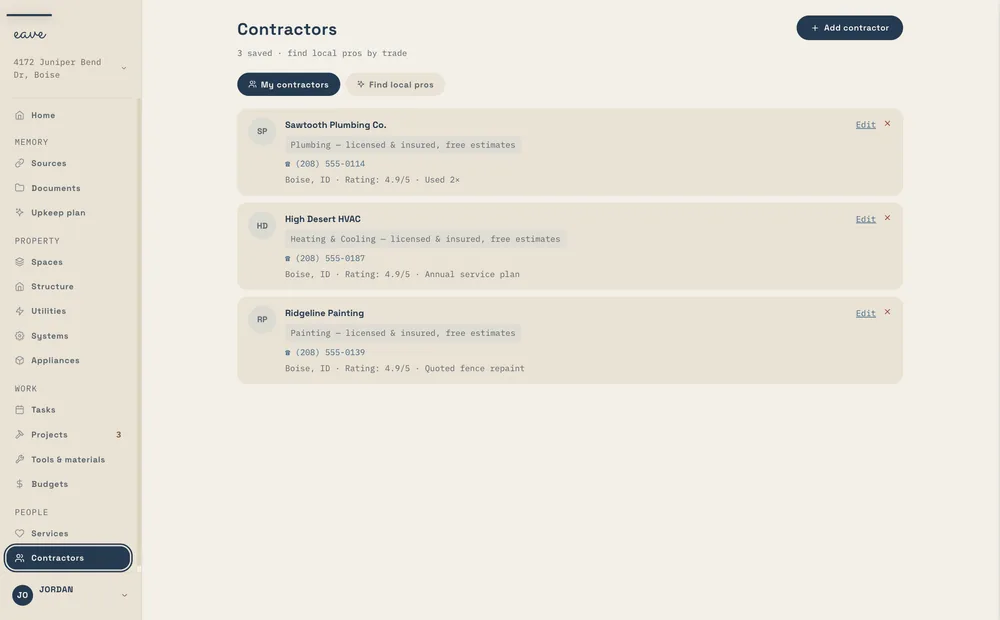
Contractors has two tabs. My contractors is your own contact book: add a pro by form, scan a business card, paste a contact, or paste a Thumbtack, Angi, Yelp, or Houzz profile link. They carry across every home on your account.

Find local pros searches by trade, free. With Eave Intelligence, a project gets its own matches, each with a line on why it’s worth hiring out. A “Find a pro” chip sits on tasks too.

HOW CONTRACTORS WORK →
app.eavehome.app
The Eave Contractors page with My contractors and Find local pros tabs, listing a plumber, an HVAC company, and a painter, each with a trade, phone number, and note
Three saved pros, each with their trade and a note.

Budgets

Every row, priced both ways

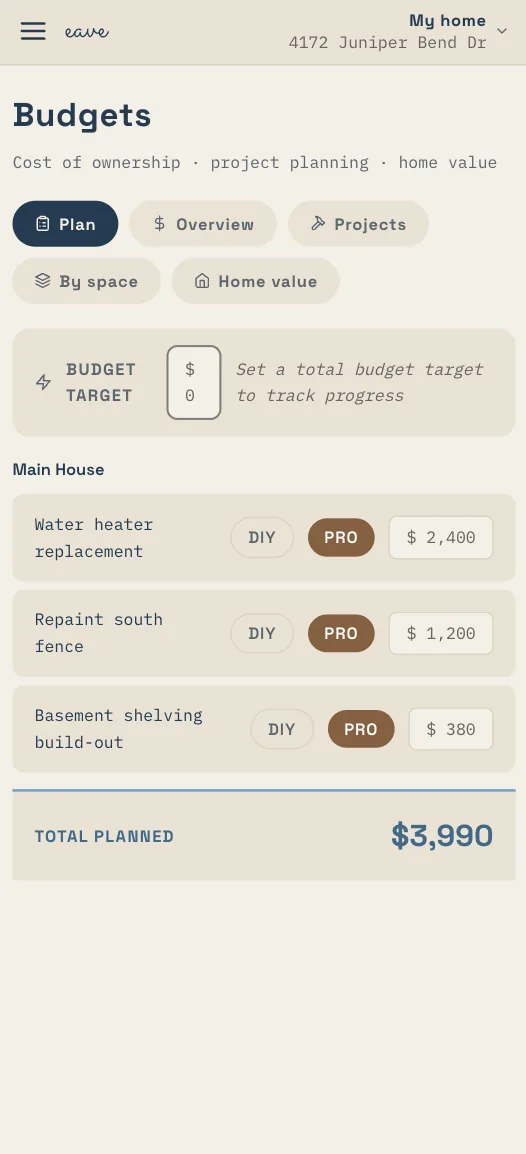
Each project in Budgets has a DIY and a PRO toggle beside its cost. Flip a row to PRO and the budget follows, so the plan can hire out the water heater and still have you building the shelves.

The DIY vs hire calculator puts a number on the choice. Enter what an hour of your time is worth and the estimated hours, and it sets doing it yourself against hiring it out.

The Eave Budgets page on a phone: a water heater replacement, a fence repaint, and a basement shelving build-out, each with DIY and PRO toggles and a cost, totaling $3,990 planned
Three projects set to PRO, and the total they add up to.

What you already own

Start from the garage, not the store

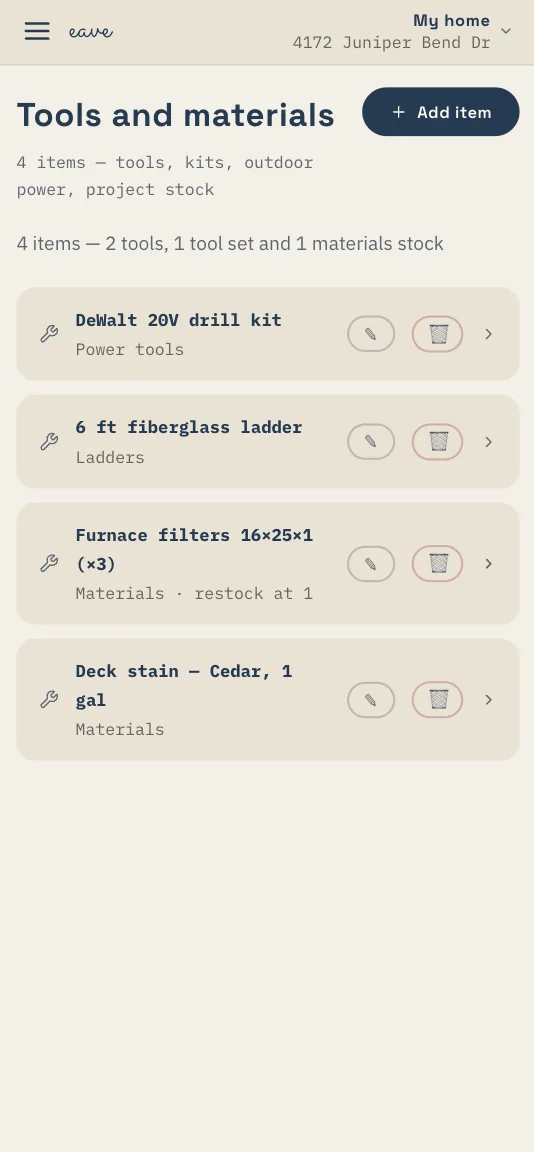
Tools & Materials keeps your tools, kits, outdoor power equipment, and project stock in one list. Tool-kit checklists turn what’s missing into a shopping list.

When a project’s plan lists tools and materials, the ones you’ve bought before are marked as ones you likely have, read from your purchase history, so the list you take to the store is shorter.

The Eave Tools and materials page on a phone listing a drill kit, a six-foot fiberglass ladder, a pack of furnace filters, and a gallon of deck stain
Tools, a ladder, and project stock in one list.

Beyond the big jobs

The same choice,
for the small stuff too.

DIY or pro isn’t only for projects. It follows the gutters, the furnace filter, and every other job that comes back each season.

01

Who handles this?

Every recurring upkeep task asks the same question: I do it, or a contractor. Pick a contractor and the task shows who it is and what it costs each time.

02

A suggested approach

Each project’s smart plan suggests DIY, Learn, or Hire, with the skill level, how long it takes, and whether a permit is needed. You make the call.

03

Guided plans know when to hire

For a repair, a guided plan starts with safety and shut-offs, then DIY triage and when to hire. For a hire, it writes the scope of work and a quote checklist.

SEE CAPTURE →
04

Before and after, kept

A before photo when you start, an after photo when you finish. Side by side, they stay in your home’s permanent record.

05

Costs you can compare

Upkeep tasks show the job both ways, like $0 DIY or $180 pro for the gutters, with a link to the budget.

06

Rather not manage it at all?

Eave Pro, a home concierge, is coming soon. Join the waitlist to hear when it opens.

EAVE PRO →

Same engine, every product

One question,
asked before and after you own it.

Do it or hire it is the same decision whether you own the house, run the building, are thinking of buying it, or are getting it ready to sell. What changes is what each product does with the answer.

Residential Upkeep

Every project, three paths

Materials estimates, tutorials picked for the job, local pros and a quote tracker, Budgets with a DIY or PRO toggle on every row, and before and after photos on the home’s record.

RESIDENTIAL →
Commercial Upkeep · supporting

Know when to call someone

Guided project plans come with org seats: triage and when to hire for a repair, and for a hire, the scope of work and a quote checklist to take to vendors.

COMMERCIAL →
Eave for Buyers · supporting

Rough costs before you offer

Candidate homes carry rough cost ranges, each labelled an estimate. They come from photos and documents; they aren’t an inspection or an appraisal.

BUYERS →
Eave for Sellers

Price the prep list both ways

The punch list before listing, from curb appeal to must-fix items, planned as DIY or pro in Budgets, so you know what getting ready costs before you start.

SELLERS →
What it won’t do. Eave helps you choose and keeps track; it doesn’t hire anyone. It won’t contact a pro, request bids, or book a job, and it takes no cut. Prices, hours, and difficulty are estimates to plan with, not quotes, and the arrangement with any contractor stays between you and them. Learn & do points you to tutorials elsewhere; it isn’t a how-to course of its own.

Questions, answered

Common questions.

Does Eave book contractors or ask for quotes for me?

No. Eave is your quote tracker, not a marketplace. It helps you find local pros, then you contact them, enter each quote as it comes in, attach it, and pick the winner. It takes no commission. More on contractors →

What’s free and what needs Intelligence?

Free: the three paths on every project, Learn & do, your contractor list, the trade-based local pro search, Budgets with the DIY or PRO toggle, and Tools & Materials. Eave Intelligence, at $2.99 a month or $24 a year, adds the materials estimate for DIY and project-specific pro matches. See pricing →

Can I switch paths partway through?

Yes. The choice is yours to change. Start as DIY, and if the job turns out bigger than it looked, switch to Hire it out and start tracking quotes.

Does Learn & do include how-to videos?

It finds them for you. You get YouTube and written-guide searches for the job, three tutorials picked for it with the reason for each, a list of common mistakes to watch for, and the first step. The tutorials themselves live on the sites that made them.

How do I add a contractor I already use?

Under Contractors, fill in the form, scan their business card, paste their contact details, or paste a Thumbtack, Angi, Yelp, or Houzz profile link. Your contractors carry across every home on your account.

How accurate are the cost estimates?

They’re ranges to plan with, not quotes. The materials estimate shows a low and high price per item, and guided plans are stamped with the date their live data was pulled. Check prices at your store, and get quotes from pros before you hire.

The rest of the engine

Every capability feeds the others.

Each one is useful alone. Together they’re why a receipt in your inbox ends up as a reminder in your plan. See how they fit together →

Get Eave

Pick one job
you’ve been putting off.

Add it to Eave and see it planned three ways: yourself, with a tutorial, or with a pro. Free for one home, in any browser.

Start free →

Weekend DIYer? See Eave for DIY homeowners. Getting ready to sell? Eave for Sellers.