Property upkeep
Residential Upkeep · for homeowners Commercial Upkeep · for businesses & nonprofits
Property transactions
Buyers · before you own it Sellers · getting ready to sell Partners · for agents & inspectors
Add-ons
Guardian · protection for Residential, coming soon Pro · home concierge
Features
Sources Capture Document intelligence Home knowledge graph Product knowledge graph Place intelligence Plans and priorities DIY or pro All features →
Explore
Pricing
Resources
Guides Support Getting started Data & privacy About Sign in Start free →

Features · Product knowledge graph

What the maker says
about your exact model.

Your water heater, your dishwasher, your furnace: somebody already wrote down how often to service it, what tends to go wrong as it ages, and which parts fit. Eave keeps one profile per brand and model in a shared library, so once one owner looks a model up, everyone who owns it gets the answer.
Add your first appliance →How it fits the engine

Free for one home. No card. Runs in any browser.

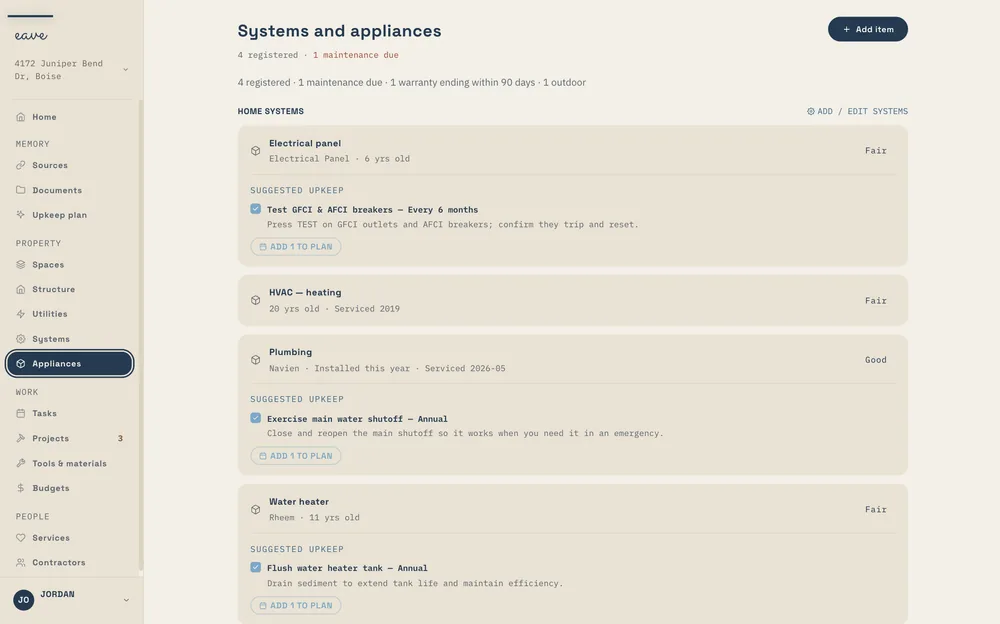
The Eave Systems and appliances page: an electrical panel, heating, plumbing, and a water heater, each with its age, condition, and Suggested upkeep
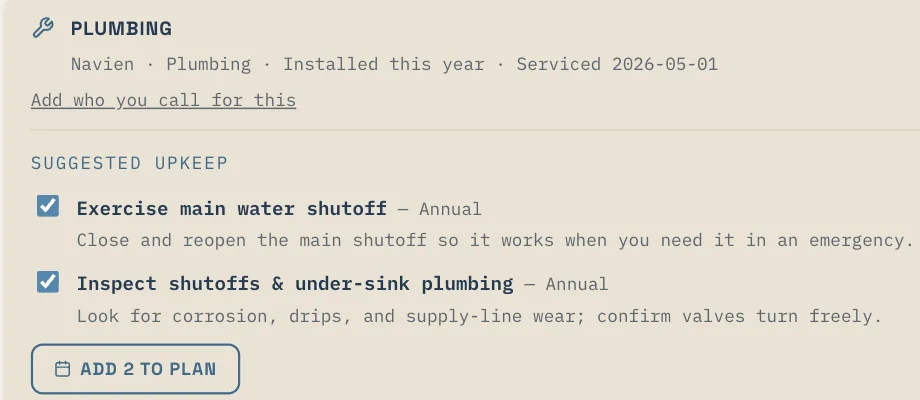
Suggested upkeep · Navien
Suggested upkeep under a Navien plumbing system: exercise the main water shutoff and inspect the shutoffs, both annual, with an Add 2 to plan button

The model problem

Someone else owns
your exact water heater.

And they’ve had the same questions you will: how often to flush it, which parts fit, what tends to go wrong as it ages. The maker wrote most of the answers down. Owners filled in the rest. Each of you has had to go and find them alone.

A knowledge graph is a set of facts joined to the things they’re about. In Eave’s product knowledge graph, each thing is one brand and model, and the facts are what’s been published about it: the maintenance schedule, the known issues, the parts, and the documents. The appliance on your home knowledge graph points to its model’s profile.

Look a model up once, and everyone who owns it has the answer.

How it works

Add it, match it,
look it up, use it.

01

Add the appliance

Snap the label, type “Rheem water heater in the garage,” or fill in the form. The brand and model are what matter here.
02

Eave finds its profile

If the library has a profile for that brand and model, or its model family, it shows on the appliance as Know your, then the model. Reading it is free.
03

No profile yet? Look it up

Look up manufacturer info researches the model on the web, from manufacturer and community sources. The profile it builds stays in the library for the next owner.
04

It shapes your upkeep

Tasks for your model rank above generic ones in Suggested upkeep, and Equipment Watch in your Upkeep Plan flags known issues that match each appliance’s age.

Know your [brand model]

Four sections, one for each
question you’d ask.

Open an appliance that has a profile and you’ll find a panel headed Know your, then the brand and model. Each section of the profile carries a confidence level, so you can see how sure Eave is about it.

01

Manufacturer maintenance

Each task the maker lists, with how often it’s due, the season it belongs in, and how to do it. Every task links to the source it came from.

Intervals, with sources
02

Known issues by age

What tends to go wrong with this model, and the age it usually shows up. When your unit reaches that age, the issue carries a Relevant now badge.

Relevant now
03

Common parts

The parts owners replace on this model, each with its part number and a Price it → link beside it.

Part numbers
04

Documents

The model’s manual, warranty, spec sheet, and parts diagram, kept with the profile so you’re not hunting for a PDF.

Manual to parts diagram

Every panel ends the same way: “Researched by Eave from manufacturer & community sources. Verify against your own manual.”

Research one appliance

The details for the unit in your kitchen

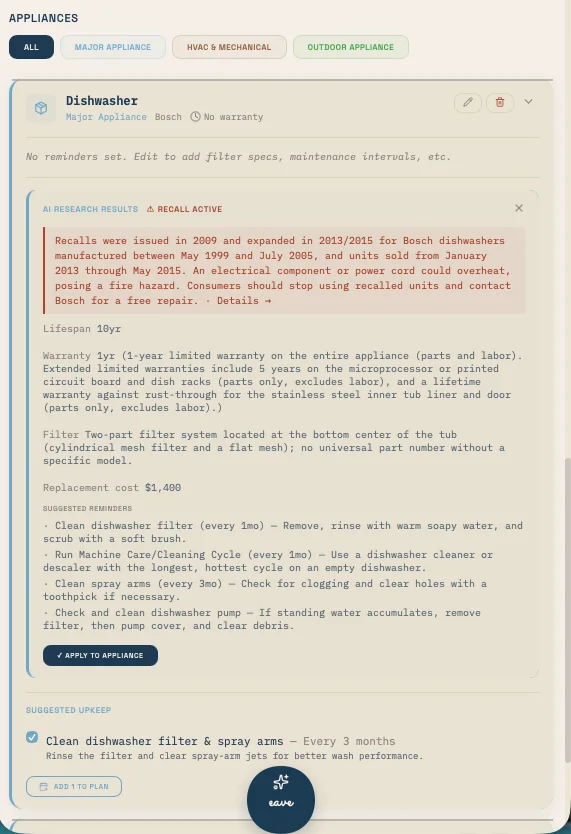
Open any appliance and ask Eave to research it. It searches the web for that unit and brings back its typical lifespan, the warranty terms, the filter it takes, a rough replacement cost, any recall notices it finds, and a set of suggested reminders with how often each is due.

Nothing lands on your appliance until you apply it. No profile for your model yet? With Eave Intelligence, Look up manufacturer info builds one for the library, so the next owner of the same model reads it for free.

SYSTEMS AND APPLIANCES →
Appliances · research
Research results on a Bosch dishwasher: a recall notice, a 10-year lifespan, warranty terms, the filter system, a replacement cost, and suggested reminders with how often each is due, above an Apply to appliance button
Research on one dishwasher, recall notice included, waiting for you to apply it.

Suggested upkeep

Your model’s tasks come first

Under each appliance and system, Suggested upkeep lists the jobs worth putting on the calendar. When the profile has the maker’s schedule for your model, those tasks rank above the generic ones that fit any furnace or any dishwasher.

Tick the ones you want and add them to your plan in one tap. The rest stay as suggestions.

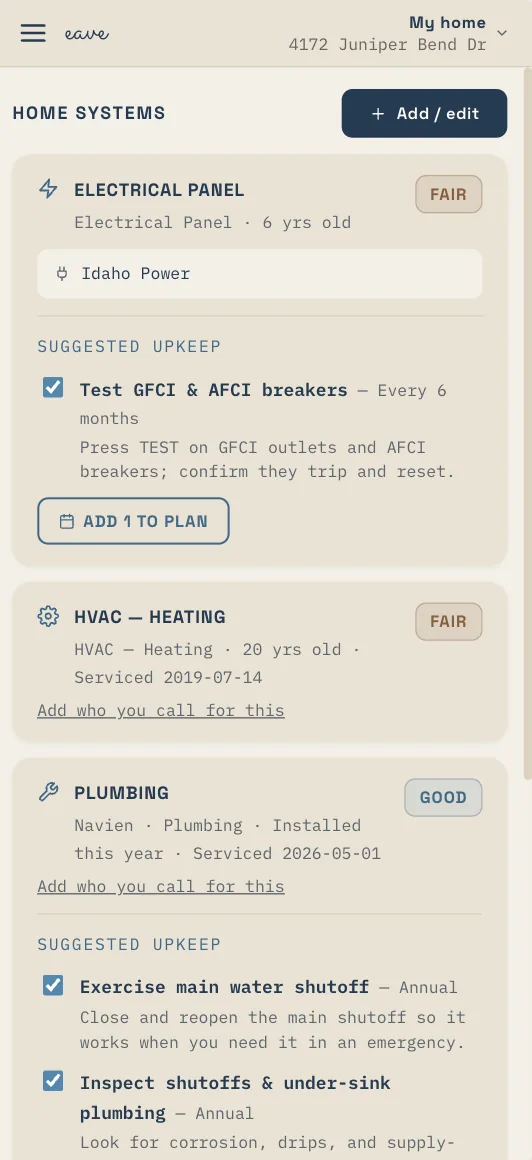
Home systems on a phone: an electrical panel and a Navien plumbing system, each with Suggested upkeep tasks, how often each is due, and an Add to plan button
Suggested upkeep under each system, with how often it’s due.

Equipment Watch

Known issues, matched to your unit’s age

A problem that tends to show up late in a model’s life doesn’t need you in its first year. Equipment Watch, in your Upkeep Plan, lists the known issues that match each appliance’s current age, so the ones in front of you are the ones that apply now.

When Eave lays out your 12-month plan, it uses the manufacturer’s schedule wherever it knows it. The Upkeep Plan and Equipment Watch are part of Eave Intelligence.

PLANS AND PRIORITIES →
app.eavehome.app
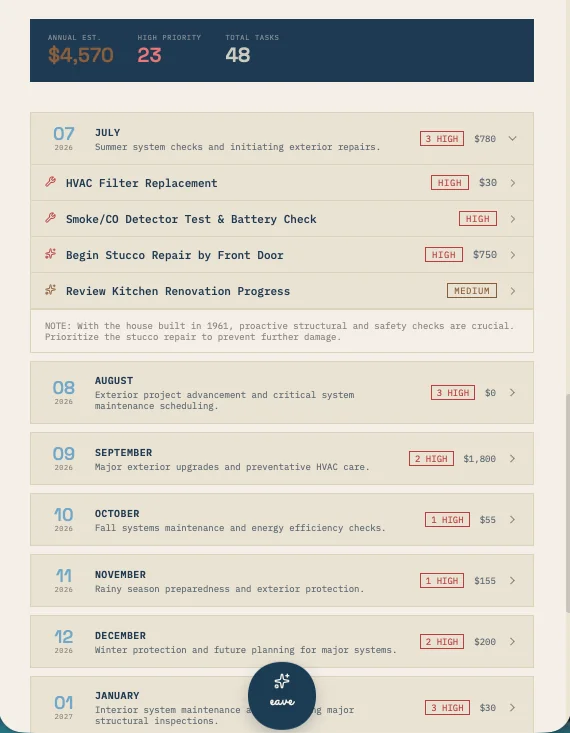
The Eave Upkeep Plan: an annual estimate, a count of high-priority items, and total tasks, then month cards from September with each task’s priority and cost
The Upkeep Plan. Equipment Watch sits on this same tab.

One shared library

Looked up once.
Read by every owner.

Your home’s record is yours alone. The product knowledge graph is the opposite: one library that every Eave user reads from, about models rather than people.

01

One profile per model

Every owner of the same brand and model reads the same profile. Profiles match model families too, so a close relative of your model can still find its match.

02

Built as owners look things up

The library grows one lookup at a time. When someone researches a model nobody has looked up yet, the result is saved to that model’s profile.

03

Free to read, on every plan

Reading a profile that already exists costs nothing, Free plan included. Only a new lookup is part of Eave Intelligence.

04

Nothing personal in it

A profile holds no personal data: nothing about who owns the model or where it’s installed. Your appliance’s own record stays private to your home.

05

A source on every task

Each maintenance task links to where it came from, and each section of the profile shows how confident Eave is in it.

06

Works beside your own manual

Upload the manual that came in the box and Eave reads it into your appliance’s record as well: specs, upkeep tasks, and how often they’re due.

MANUALS AND INSURANCE →

Same engine, every product

One library,
wherever there’s equipment.

The profile behind a homeowner’s dishwasher is the same one any other Eave user sees for that model. What changes is what each product does with it.

Residential Upkeep

Know your water heater

Every appliance and system on your record can show its model’s profile. Its schedule feeds Suggested upkeep and your Upkeep Plan, and Equipment Watch keeps track of known issues as each one ages.

RESIDENTIAL →
Commercial Upkeep · supporting

The building’s equipment, by model

Equipment in a church, a shop, or an apartment building has a maker and a model too. Members of a paying Commercial organization get Intelligence-level features, manufacturer lookups included.

COMMERCIAL →
Eave for Sellers · supporting

Answers a buyer will ask for

How old is the dishwasher, and what does it need? Your record shows the model, and its profile shows the maker’s schedule. The profile is shared, so it’s there for the next owner too.

SELLERS →

Your manual has the last word

Research, checked against the real thing

A profile is gathered from manufacturer and community sources, and it says so at the bottom of every panel. When your own manual and the profile disagree, go with your manual.

The manual in the kitchen drawer is worth uploading anyway. Eave reads it into that appliance’s record: the parts it needs, the specs, and how often each job comes around.

HOW MANUALS ARE READ →
Setup · manuals
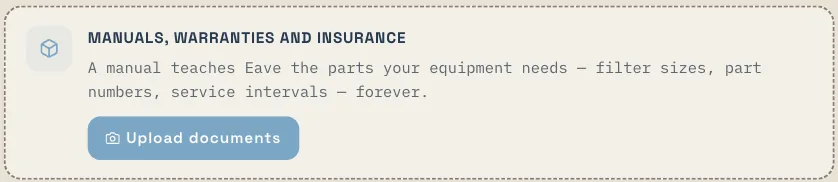
A setup card for manuals, warranties, and insurance, explaining that a manual teaches Eave the parts your equipment needs, with an Upload documents button
Manuals, warranties, and insurance, added during setup.
What it won’t do. A profile is research, not a service visit. It won’t inspect your unit, diagnose a fault, or tell you a repair is safe to do yourself. Recalls come from two places outside the profile: the research on a single appliance flags any recall notice it finds, and every week Eave checks your appliances against the U.S. Consumer Product Safety Commission’s recall database, SaferProducts.gov, by brand and model.

Questions, answered

Common questions.

What is a product knowledge graph?

A shared library of what’s known about specific models: one profile per brand and model, with the manufacturer’s maintenance schedule, known issues by age, common parts with part numbers, and documents. Your appliance on your home knowledge graph points to its model’s profile.

Is it free?

Reading a profile that already exists is free on every plan. Look up manufacturer info, which researches a model that isn’t in the library yet, is part of Eave Intelligence at $2.99 a month or $24 a year, along with Equipment Watch in the Upkeep Plan. See pricing →

Does anything about me or my home go into a profile?

No. A profile is about the model and holds no personal data. Your appliance’s own record, with its serial number, install date, and history, stays private to your home. Data & privacy →

How accurate is it?

Profiles are researched from manufacturer and community sources. Every maintenance task links to its source, and each section of a profile shows how confident Eave is in it. Check it against your own manual, and when they disagree, go with the manual. Uploading manuals →

What if my model isn’t in the library?

Profiles match model families as well as exact models, so a close relative may already be there. If not, Look up manufacturer info builds the profile, and it stays in the library for the next owner of that model. Systems and appliances →

How does it change my upkeep?

In Suggested upkeep, tasks from your model’s profile rank above generic ones. Your Upkeep Plan uses the manufacturer’s schedule where it knows it, and Equipment Watch lists the known issues that match each appliance’s current age. Plans and priorities →

Does a profile include recalls?

No. Recalls come from two places outside the profile: the research on a single appliance flags any recall notice it finds, and every week Eave checks your appliances against the U.S. Consumer Product Safety Commission’s recall database, SaferProducts.gov, by brand and model.

The rest of the engine

Every capability feeds the others.

Each one is useful alone. Together they’re why a receipt in your inbox ends up as a reminder in your plan. See how they fit together →

Get Eave

Add one appliance.
See what’s known about it.

Snap the label on the water heater, or type its brand and model. Free for one home, in any browser, and reading a model’s profile is free on every plan.

Start free →

Looking up a model that isn’t in the library yet is part of Eave Intelligence, $2.99 a month.