Features · Place intelligence
The listing tells you the square footage and the kitchen. It doesn’t tell you the flood zone, the fire zone, the soil, or the tax rate. Give Eave an address and it looks those up from the public sources that publish them, marks every value with where it came from, and says estimate when it is one.
Free for three homes and their facts. No card. Runs in any browser.

The listing gap
A listing covers the kitchen and the square footage. Whether the house sits in a flood zone, in a fire hazard zone, or on clay that swells and shrinks is written down somewhere else: in maps kept by FEMA, CAL FIRE, USGS, and the USDA, and in county records.
Place intelligence goes and gets those facts for every address you give it, and keeps the trail back to where each one came from.
Facts with sources. Never judgments about an area, its schools, or its people.
How it works
What it looks up
These come straight from public sources. Eave shows the official zone or value and names the agency; it never swaps in a vendor’s score.
The official FEMA zone and the map panel it comes from, from the National Flood Hazard Layer. An A or V zone means the lender will require flood insurance.
FEMAThe state fire hazard severity zone for the address, which shapes your insurance options as much as your risk. California homes only.
CAL FIRE · CaliforniaThe USGS seismic design values for the site: the figures engineers use when they design for earthquakes.
USGSThe soil type from the USDA soil survey, and whether it’s expansive clay, the kind that swells when wet and shrinks when dry under a foundation.
USDA soil surveyAir quality for the location, from the EPA.
EPAThe district the home is zoned into, by name, from Census boundaries. Nothing more, by design: no ratings, no rankings.
Census · district onlyWhose service territory the address sits in, so you know who to call before you own it.
Service territoryWhat the FCC’s broadband data shows as available at the address.
FCCThe county and the city or town the home sits in, which decide whose permit office and whose tax rate apply.
Census geocoderWhat it estimates
Frost dates and a tax rate matter just as much, but no single public map holds them. Eave researches these for the location and labels every one of them as an estimate, wherever it appears.

Anything researched instead of looked up carries the word beside it, like the 1.1% tax rate on a candidate. Lookups name their agency; estimates never borrow one.
A home built before 1978 gets a lead paint flag. That’s the year lead-based paint was banned for homes, so older houses may still have it under newer coats.
A signed natural hazard disclosure outranks Eave’s own map lookups. The record shows which source each zone came from, so you can see what the seller signed and what the map says.
HOW DISCLOSURES ARE READ →Buyers · Compare
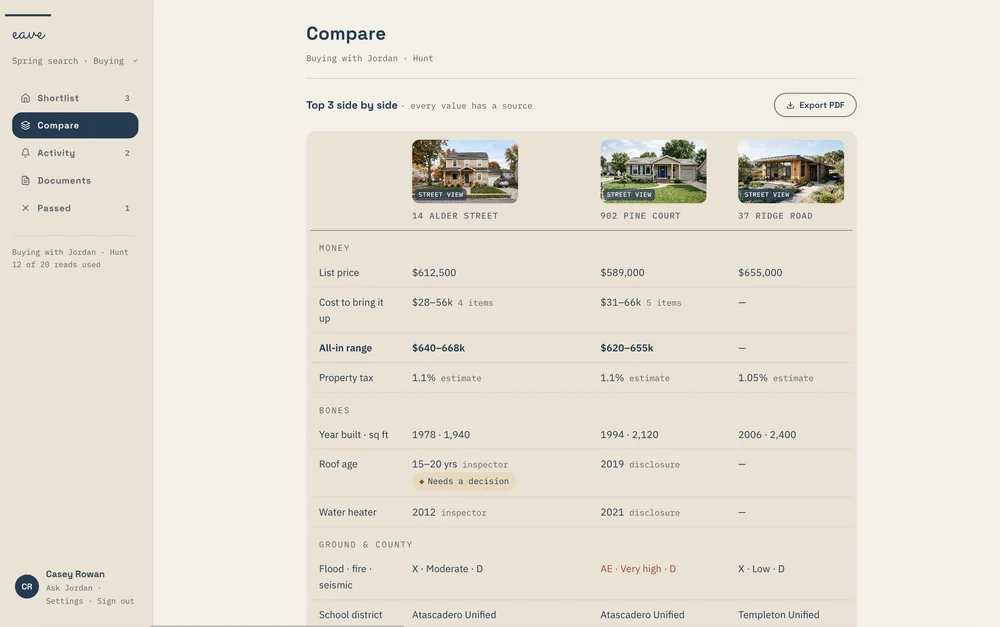
The facts sit on every home you add: flood, fire, seismic, broadband, electric utility, school district, property tax, county, and municipality. Pull the facts again whenever you want them fresh.
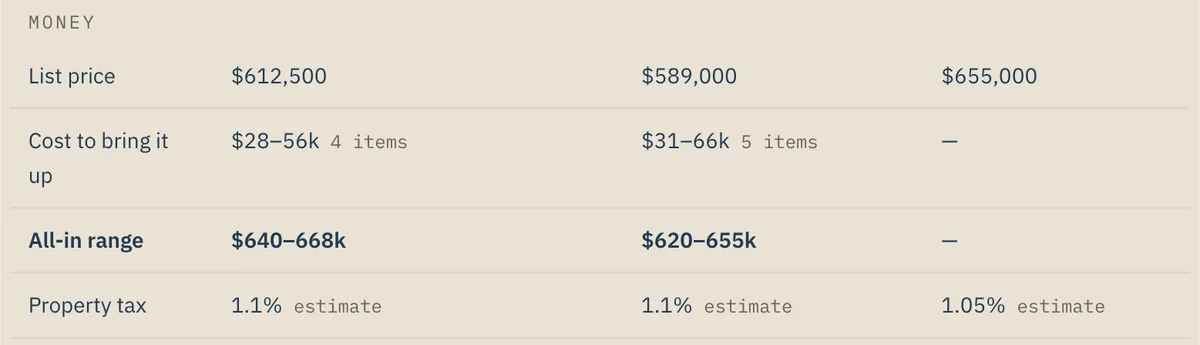
Compare lines up the top three on the ground and the county, next to the price, the cost to bring it up, and the bones of each house. Every value has its source.
COMPARING TWO HOUSES ON WHAT THEY REALLY COST →
Buyers · Shortlist
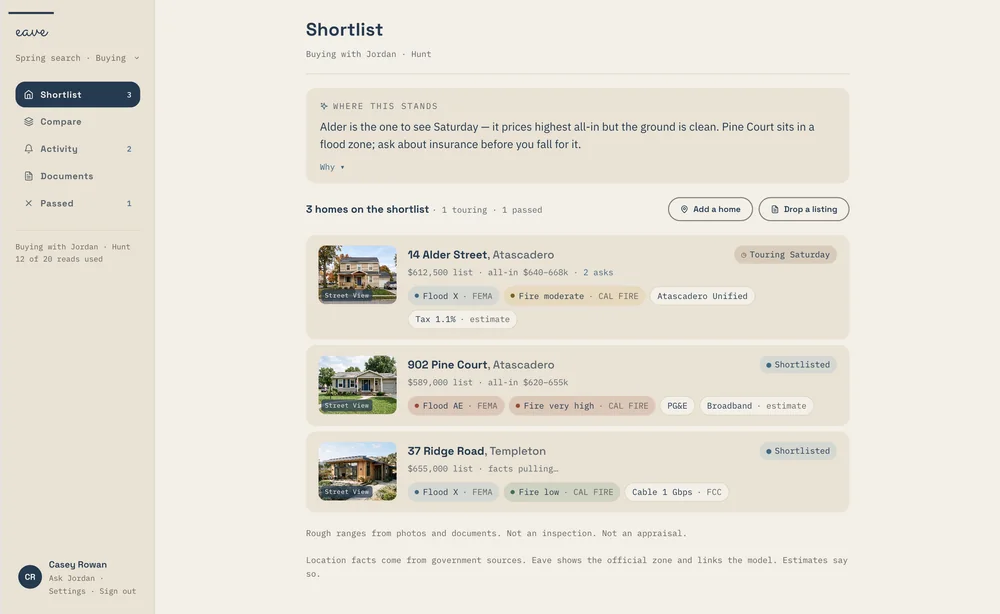
A note at the top of the shortlist says where the search stands, and the facts feed it. A home in a flood zone gets named, with the question worth asking before you fall for the house.
The note talks about the ground, the price, and the paperwork. It never says anything about who lives nearby, and a school district appears by name only.
WHAT A LISTING NEVER TELLS YOU →
Residential · Utilities
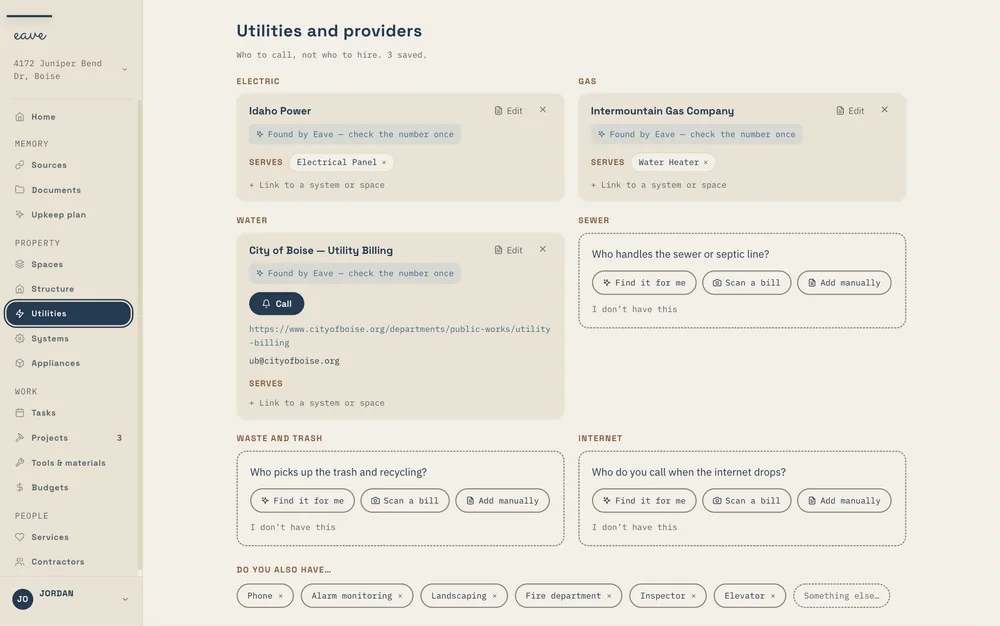
Set up a home and Eave already knows some of it: the climate, the municipality, and the electric utility. On Utilities, providers found from the address are marked Found by Eave, with a nudge to check the number once.
Sources lists the lookups under Property data — automatic. The Upkeep Plan shows your home’s risk profile, each flag linked to its source, and the first and last frost dates time the Season ahead on Tasks.
CONNECTED SOURCES, EXPLAINED →
Same engine, every product
The lookup that puts a flood zone on a buyer’s shortlist is the same one behind a homeowner’s risk profile and a building’s utilities. What changes is what each product does with the facts.
Flood, fire, seismic, broadband, electric utility, school district, property tax, county, and municipality on every home you add, compared side by side. Three homes and their facts are free.
BUYERS →The Upkeep Plan tab shows the risk profile with a source link on each flag, free. Setup starts with what Eave already found, and frost dates time the Season ahead.
RESIDENTIAL →Commercial setup finds the building’s utilities from its address, so the providers are on file before anyone digs out a bill.
COMMERCIAL →Fair housing
Where a home sits is a fact. What an area is “like” is an opinion, and Eave doesn’t offer one.
Questions, answered
The rest of the engine
Each one is useful alone. Together they’re why a receipt in your inbox ends up as a reminder in your plan. See how they fit together →
Get Eave for Buyers
Add a home you’re considering and see the ground and the county, each fact with its source. Three homes and their facts are free, in any browser.
Already own it? Your risk profile is in Residential Upkeep. Running a building? Commercial Upkeep.