Eave is your home's memory, so it helps to remember what you've bought for your home — appliances, filters, warranties. Instead of asking you to log in to every store, Eave reads the order emails that are already in your inbox, and always shows you what it found before saving anything.
Connect your email
- Go to Sources in the sidebar (under People & Sources).
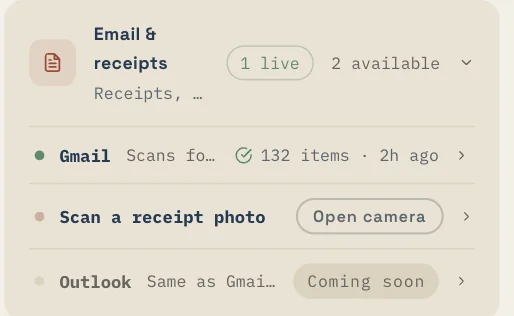
- Under Email & receipts, choose your provider:
- Gmail — connect with your Google sign-in, then use Scan inbox.
- Outlook — marked coming soon and not yet available. Check back later.
- When you scan, Eave looks for appliance receipts, contractor invoices, warranty emails, and purchase history.
Each scan reviews up to 30 messages at a time. That keeps things quick and easy to check.
Preview before anything is saved
Nothing goes into your home from an email scan until you say so. For every receipt Eave finds, it shows you a summary and you confirm or skip it, one by one. Imported appliances and contractors get the same review step. If Eave misreads something, you can skip it — your home's record only holds what you've approved.

Why there's no Home Depot or Lowe's login
You'll see Home Depot, Lowe's, and Amazon listed under Purchases, but Eave never asks for a store password. Here's how those work:
- Home Depot and Lowe's — order-confirmation emails import automatically once Gmail is connected. The card reads "via email scan."
- Amazon — imports through your Gmail scan, or you can upload an order-history file (Account → Request my data) using Import order file.
So the mechanism is email receipts, your secure Google connection, and file import — not a stored store password. A direct store account link is described only as a future possibility "when the retailer allows it." Your retail purchases are captured the same safe way regardless.