Property upkeep
Residential Upkeep · for homeowners Commercial Upkeep · for businesses & nonprofits
Property transactions
Buyers · before you own it Sellers · getting ready to sell Partners · for agents & inspectors
Add-ons
Guardian · protection for Residential, coming soon Pro · home concierge
Features
Sources Capture Document intelligence Home knowledge graph Product knowledge graph Place intelligence Plans and priorities DIY or pro All features →
Explore
Pricing
Resources
Guides Support Getting started Data & privacy About Sign in Start free →

Features · Document intelligence

Any document.
Read into facts
you can trace.

The closing folder, a disclosure packet, a purchase agreement, a warranty card. Eave works out what each document is, reads out what matters, and files every fact where it belongs, marked with the document it came from. Newer versions are kept beside the old ones, with what changed between them.

Drop in your first document →How it fits the engine

Free for one home. No card. Runs in any browser.
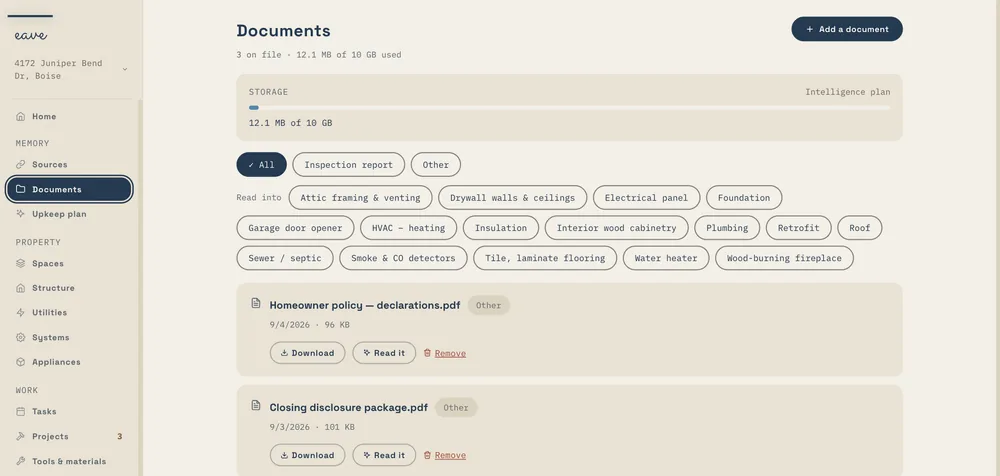
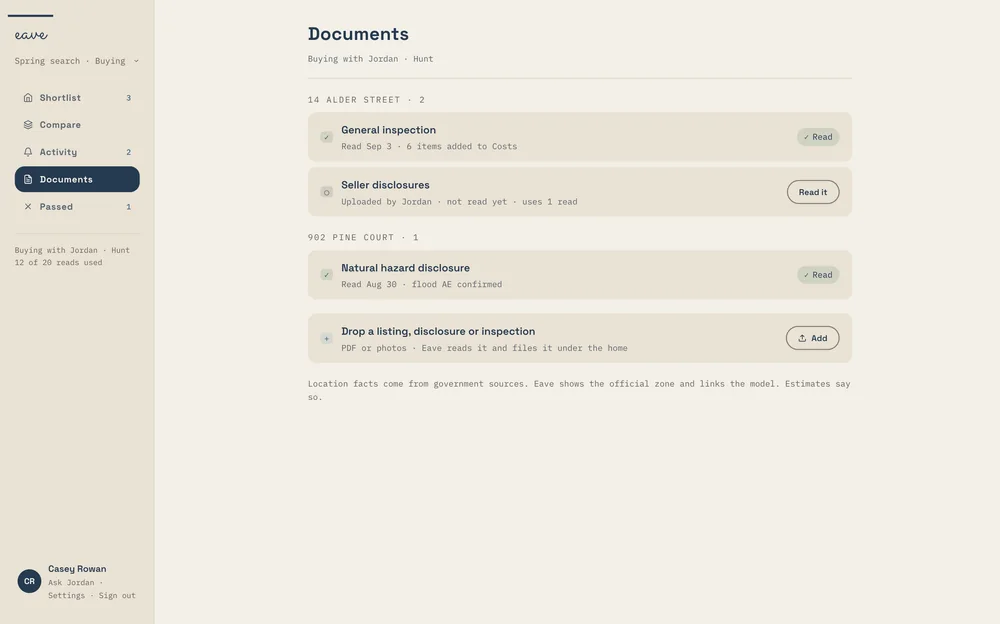
The Eave Documents page: files grouped by kind, each showing the parts of the home it was read into
Documents · a file
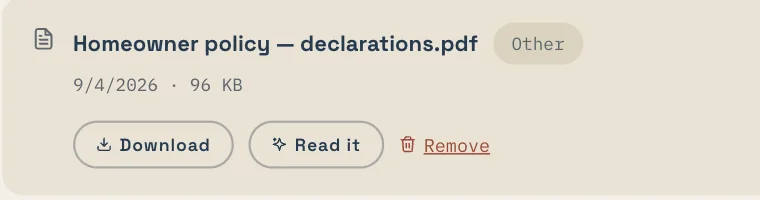
A document row for a homeowner insurance declarations page, with Download, Read it, and Remove

The paper problem

The answers are already written down.
Nobody has time to read them.

A house comes with a stack of paper: the closing packet, the inspection, the disclosures, the manuals, the warranties, the permits. Almost every answer you’ll need later is in there somewhere, usually on page nine.

Document intelligence reads the stack for you, and keeps the trail back to the original so you can check any fact it filed.

“We had a folder three inches thick and I hadn’t opened it since the day we signed.”

46 kinds
of property document recognized on upload, from purchase agreements to association minutes
10 readers
each built for one kind of paper: inspections, manuals, policies, closings, leases, and more
Every version
kept, newest on top, with what changed since the one before

How it works

Recognize it, read it,
file it, keep it.

01

Drop it in

A PDF, a scan, or a phone photo of the page. Upload the same file twice and Eave uses the copy already on file.
02

Eave works out what it is

It looks at the first pages and decides the kind, who sent it, and its date. Not sure? It offers its best guesses and you pick.
03

The right reader runs

Each kind has its own reader. An inspection gives findings by system; a manual gives upkeep intervals; a policy gives coverages and renewal dates.
04

The facts are filed

Each fact lands on the part of the home it’s about, marked as read from that document. When sources disagree, Eave asks you.

What it recognizes

Forty-six kinds of paper,
in seven families.

The kind decides what happens next: which reader runs, where the facts go, and which stage of a purchase the document belongs to. You can always change the kind, and Eave learns from the correction.

Buying and selling

Purchase agreementCounter offerAddendum or contingencySeller disclosureSeller questionnaireNatural hazard disclosurePreliminary title reportDeedEscrow or settlement statementLoan estimateClosing disclosureAppraisalFinal walkthroughListing sheet

Inspections

Home inspectionPest or termite reportRoof inspectionSewer scopeChimney inspectionPool inspectionMold or radon testWell or septic inspectionStructural or engineer’s report

Running the house

Appliance manualWarranty cardReceiptService notePermitSite planSurveyUtility billFloor plan

Association

CC&RsAssociation rulesAssociation budgetAssociation minutesDemand or estoppel

Insurance and warranties

Insurance quoteInsurance policyDeclarations pageHome warrantyAlarm monitoring agreement

Tenants, and the rest

LeaseLease renewalMove-in condition reportSomething else

What it reads out

A reader for each kind
of paper that matters.

Recognizing a document is the start. For the kinds that carry facts about the property, a dedicated reader pulls out the parts you’ll need later.

01

Inspections

The inspector, the date, each system with its brand, install year, and condition, and every finding with its severity and a rough cost.

Findings by system
02

Manuals and warranty cards

Brand, model, specs, the upkeep tasks and how often they’re due, and the warranty terms with the date they end.

Upkeep intervals
03

Insurance

Carrier, policy number, coverages, deductible, premium, and the effective and renewal dates. A quote is kept apart from the policy you hold.

Renewal dates
04

Closings, appraisals, and title

Price, dates, the parcel number, lender, title and escrow companies, the appraised value and the home’s vitals, and how title is held.

The deal on record
05

Purchase agreements

Price, deposit, dates, each contingency, what’s included and excluded, seller credits, and possession, laid out as a table of deadlines.

Counters and addenda too
06

Leases, HOA packets, and hazard disclosures

Who handles what under the lease and which rules the association sets, each quoted with its page, plus the flood, fire, and seismic zones on a hazard disclosure.

Quoted with the page

Read into the record

Facts land where they belong

A single inspection can touch the roof, the furnace, the electrical panel, and the water heater. Eave reads the findings into each of them, so the roof’s record shows what the inspector said about the roof, and the report is one click away.

Every document row shows what it was read into, with links to each item. Anything Eave filed on its own is marked as read from a document and can be undone.

HOW DOCUMENTS WORK →
app.eavehome.app
A documents list for one home: a pre-inspection, a seller disclosure, and a natural hazard disclosure, each with what it was read into
Documents on one home, each showing what it was read into.

Needs a decision

When two sources disagree, you choose

The inspection says the roof is 15 to 20 years old. The disclosure says it was replaced in 2019. Eave doesn’t pick one quietly. It leaves the record as it was and shows both, so you can use one, keep both as a range, or dismiss it.

Some sources count for more than others. What you entered comes first, then signed documents, then what someone saw on site, then public data, and Eave’s own guesses come last.

Needs a decision · roof age
Two sources disagree on the roof age: 15 to 20 years in the inspection, 2019 in the disclosure, marked Needs a decision
Two sources, one question, your call.
Documents · read into
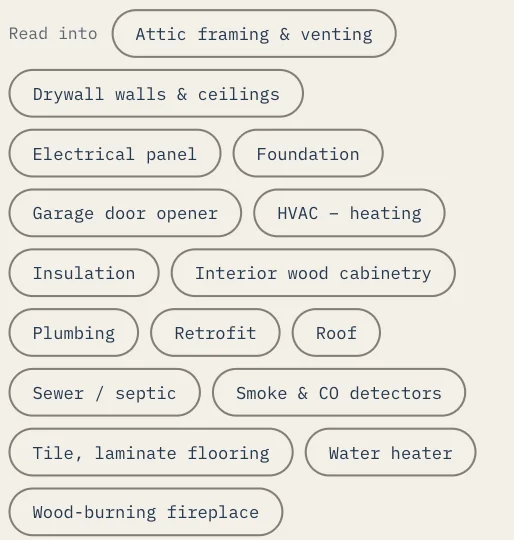
A filter row of everything the documents were read into: attic framing, drywall, electrical panel, foundation, HVAC, plumbing, roof, water heaters, and more
Filter the folder by what it touches.
Inspection · read
An inspection for one home read into five findings, one urgent, with a link to review them
An inspection turned into findings to review.
Documents · storage
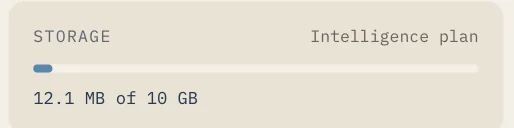
Storage meter showing space used on the Intelligence plan
1 GB on Free, 10 GB on Intelligence.

Versions

Documents change.
Eave shows you how.

A revised disclosure, a renewed policy, an updated association budget. When something looks like a newer version of a document you have, Eave asks before it does anything: replace it, keep both, or not related.

01

Every version kept

A replaced document is marked superseded, not deleted. The list shows how many earlier versions there are, and they’re a tap away.

02

What changed, in plain words

Under the current version, a short list of what changed since the last one: the renewal date moved, the deductible went up, a new finding appeared.

03

Who sent it, and when

Each document keeps its sender, from the seller, an inspector, or a lender, and the date on it, so a stack of paper sorts itself into order.

04

Reads in the background

A long report reads while you carry on. Eave lets you know when it’s ready to review.

05

Scans and photos count

PDFs and photos both work, iPhone photos included. A scanned page is read just like a digital one.

06

Yours to remove

Remove a file and it’s deleted for good. What you already confirmed from it stays on your home’s record.

Same engine, every product

One reader,
five kinds of paperwork.

The reader that files a homeowner’s closing folder is the same one that reads a buyer’s disclosure packet and an agent’s purchase agreement. What changes is what each product does with the facts.

Residential Upkeep

Set up a home from its paperwork

Drop in the closing folder, a utility bill, and the manuals during setup, and Eave builds the record from them: systems and their ages, providers, warranties, and a first plan from the inspection.

RESIDENTIAL →
Commercial Upkeep · supporting

The building’s binder, filed

Site plans, service records, and equipment manuals, added during setup and filed to the building they belong to, so the next person in the role can find them.

COMMERCIAL →
Eave for Buyers

Read what the seller handed you

Disclosures, the inspection, the HOA packet, and the title report, read onto the house you’re considering, with conflicts flagged before you make an offer.

BUYERS →
Eave for Sellers

The paperwork a buyer will ask for

Receipts, permits, and manuals, already read into the systems they describe, so “how old is the water heater?” comes with the document behind it.

SELLERS →
Eave Partners

The timeline from the agreement

Escrow Desk reads the executed purchase agreement into the deadlines it sets, and shows what changed field by field when a counter or addendum arrives.

PARTNERS →
What it won’t do. Eave reads and files; it doesn’t give legal, lending, or inspection advice. It won’t decide whether a finding still applies, whether a disclosure is complete, or what a contract means for you. Those calls stay with you and the professionals you work with, and everything Eave filed shows the document it came from, so you can check.

Questions, answered

Common questions.

What kinds of documents can Eave read?

Eave recognizes 46 kinds of property document in seven families, from purchase agreements and inspections to manuals, policies, association papers, and leases. Ten readers pull the facts out of the kinds that carry them. More on documents →

How big can a file be?

You can store files up to 100 MB. Eave reads files up to 15 MB automatically; bigger files are kept on the home all the same. Every plan includes storage: 1 GB on Free and 10 GB on Intelligence.

Is document reading free?

On Residential, setup reads your paperwork on every plan, Free included. Reading documents you add later, from the Documents page, is part of Eave Intelligence at $2.99 a month. Buyers get reads with each home on their plan. See pricing →

Does Eave change my records on its own?

Only when it’s confident, and always with an undo. When a document disagrees with what’s already on the record, it changes nothing and asks you.

What if it reads something wrong?

Fix it or remove it. The mark showing which document it came from stays, so you can always tell what came from paperwork and what came from you.

Who can see my documents?

You and the people you invite to the property. Documents and photos are private to your home and never sold. Data & privacy →

The rest of the engine

Every capability feeds the others.

Each one is useful alone. Together they’re why a receipt in your inbox ends up as a reminder in your plan. See how they fit together →

Get Eave

Start with the folder
you haven’t opened.

Drop in the closing folder, the inspection, or one manual. Free for one home, in any browser, and every fact Eave files shows where it came from.

Start free →

Buying? Eave reads the seller’s packet: Eave for Buyers. An agent? Escrow Desk.