Eave organizes your home in two layers: your property (the address itself) and the spaces inside it (the distinct structures and zones you keep up). Here's how the two fit together and what to expect as your home grows.
Properties vs. spaces
A property is a single address — your home. Today, every account has one property, and it's always the center of everything Eave tracks: your tasks, projects, appliances, and history all live under it.
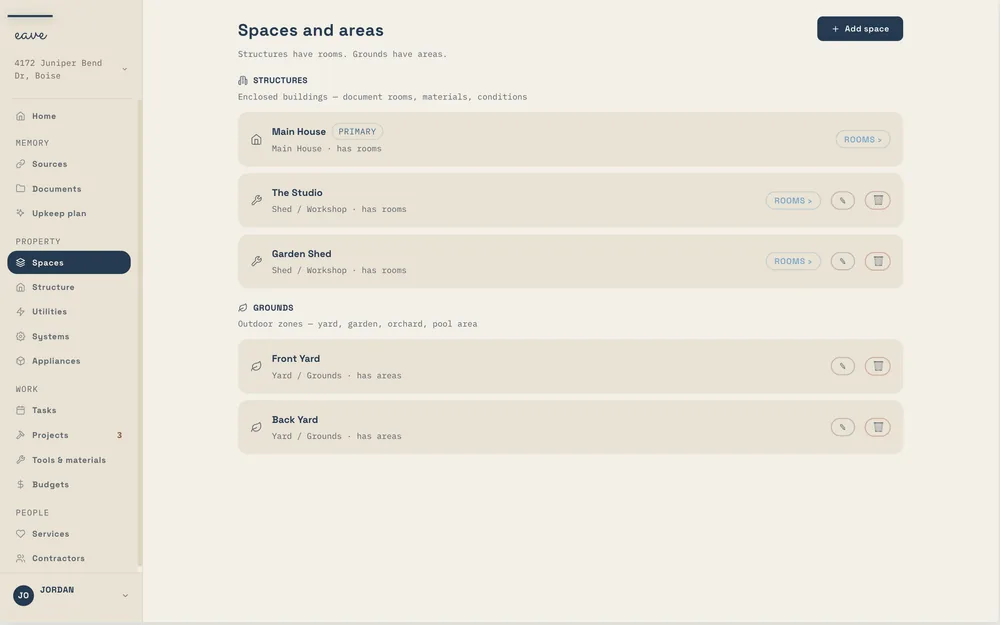
A space is a distinct part of that property. Your Main House is one space; a detached garage, a shed, an ADU, a pool house, or the yard can each be their own space too. Breaking your home into spaces lets you keep upkeep, inventory, and projects organized by where they actually happen, instead of one long undifferentiated list.
You'll find everything under Spaces in the sidebar, in the Property group.
Why Main House can't be deleted
Every property starts with a Main House, and it's there to stay. It's the anchor that the rest of your home hangs off of, so Eave keeps it in place — you can't delete it. You can rename it and add details, but it will always be there as home base.
Every other space is fully yours to manage. Add the ones that match your property, edit them, and remove any you no longer need. There's no wrong number of spaces — start with just the Main House, or map out every structure on the lot.
Adding and organizing spaces
- Open Spaces from the sidebar.
- Add a space for each structure or zone you want to track separately (garage, shed, yard, ADU, and so on).
- Give it a clear name and any details you'd like to remember.
When you create a project or task, Eave ties it to the right space. If your home has only the Main House, that happens quietly in the background — you don't have to think about it.
Sharing one home
One property can have several people in it. Invite a co-owner, a helper, or a time-boxed house sitter from Property settings → People with access; seats are free on every plan. See Sharing your home.
Managing multiple properties
Free and Intelligence each cover one property, which is all most homeowners need. To manage more, Eave Multi-Property is an add-on to Eave Intelligence for 2–5 properties: $4.99/mo or $39/yr on top of Intelligence ($7.99/mo or $63/yr in all). Condition reports and a tenant issue link are on the roadmap. Seats stay free — add co-owners or a property manager at no extra cost. For 6+ properties, Eave Portfolio is on the way — join the waitlist.
The property switcher in the top-left corner is always there — tapping Add property shows you the multi-property option.