Your Upkeep Score is a single number, from 0 to 100, that reflects how well your home is being kept up. Think of it as a quick health check for your home. You'll find it on your Home page and on your Upkeep Plan.
What the score measures
The score looks at a few things together and blends them into one number:
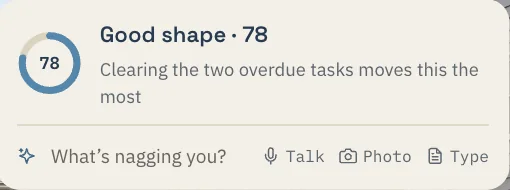
- Maintenance that came due, and got done. Eave only counts a season that has passed, so a task you added yesterday is pending rather than late. This carries the most weight.
- How healthy your project backlog is. A few open projects are normal. Projects that sit unfinished for a long time with no activity start to weigh on the score.
- How ready the house is. Overdue appliance reminders and warranties about to lapse nudge the number down.
- Consistency is shown but not counted. Your streak appears on the score card for interest; it no longer moves the total.
Adding tasks can never lower your score. Building out your home's plan is safe. The number moves when the work moves, and adding to the list changes nothing.
You don't need to do anything to turn it on. The Upkeep Score is a free feature, included on every plan.
What moves it up
- Completing maintenance tasks within their season
- Finishing or updating projects instead of letting them stall
- Handling appliance reminders (like a filter swap) when they come due
- Keeping warranties and coverage current
What moves it down
- Maintenance tasks going overdue
- High-priority projects left unfinished
- Appliance reminders you've passed
- Missing an entire season of upkeep
- Warranties expiring soon without action
The score runs from 0 to 100 and recomputes about once a day. Miss a window and the task rolls forward to the next one, so one busy month doesn't follow you around. If you bought the house in the last ninety days, nothing shows as overdue yet, and your score starts fresh.
How to improve it
- Open your Home page and glance at what's flagged as overdue.
- Clear the quick wins first — check off maintenance tasks you've already done, and knock out any short appliance reminders.
- Pick one High-priority project and either move it forward or mark it complete.
- Stay in the current season. Doing this season's tasks before it ends is the single biggest thing that keeps the score steady.
- Check back over time. As you keep up, the number climbs on its own — no need to chase it daily.